.png)


Ontrof: Taking an AI-Built React and Node Product to Production, Safely
A travel quotation product generated with Emergent, moved from MongoDB to PostgreSQL and made production-ready by Apothem without rewriting it.
At a glance
| Client | Ontrof (Online Travel Office): ontrof.com, a quotation builder for DMCs and tour operators |
|---|---|
| Industry | Travel · SaaS |
| Original build | Generated by the client on Emergent (AI app builder), on MongoDB; not built by Apothem |
| Stack | React, Node.js, PostgreSQL (migrated from MongoDB), Supabase for development |
| What Apothem did | Database migration, server, deploy pipeline, schema-diff tool, ongoing operations |
| Infrastructure | Linux VPS, Nginx, PM2, GitHub webhook to a deploy script on the server |
| Services | Cloud & DevOps, Custom Software Development |
The challenge
Apothem did not build Ontrof. Its founder built a working travel quotation product on Emergent, an AI app builder: React, a Node.js API and, because that is what Emergent provides, MongoDB. It worked, but had nowhere real to live and no safe way to change.
The first problems were the usual ones for AI-generated code outside its sandbox: CORS set for the wrong domain, API URLs hardcoded to localhost, no .env, and a Node version mismatch with the server.
The harder problem was the database, in two layers. The data model was relational (packages, itineraries, suppliers, customers, quotations) and suited a relational database better than MongoDB. And Emergent writes no migration files; it alters the development database directly, so there is nothing to replay on production. It also sometimes adds a new table instead of extending one: a separate customers table appeared beside a users table that already had a customer type. Every deploy risked a production database that no longer matched the code.
The founder needed to keep building in Emergent and get fast help, without hiring an engineer.
What we built
Not a rewrite. We left the code as the builder generates it and built the operations around it.
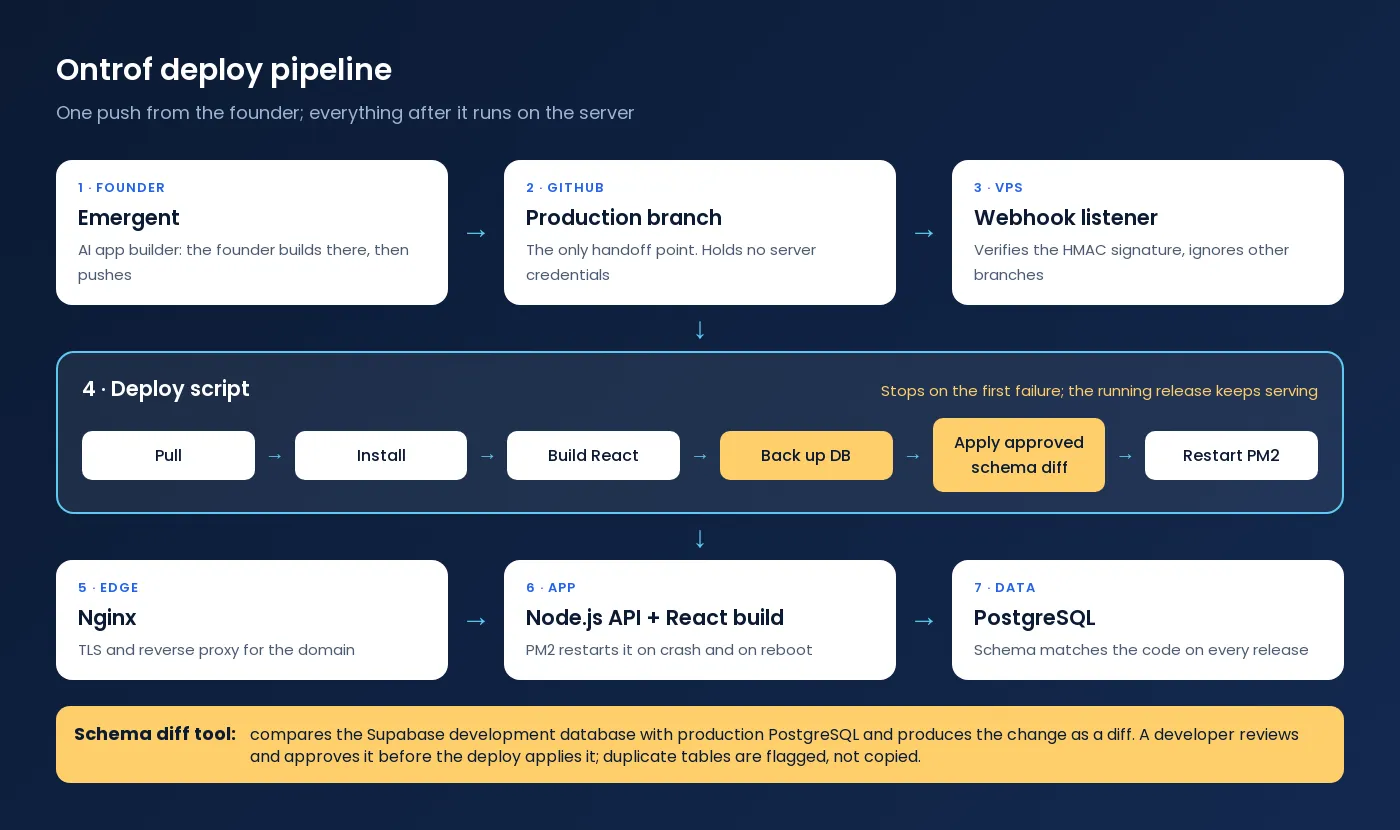
- Production server. A Linux VPS, Nginx for TLS and reverse proxy, PM2 restarting Node on crash and reboot.
- MongoDB to PostgreSQL migration. A PostgreSQL schema designed from the data the app held, the data migrated, and the Node data layer adjusted, not rewritten. Development runs on Supabase PostgreSQL, so Emergent’s changes land in a real Postgres schema.
- Environment and build fixes. CORS set for the real domain, API URLs moved to environment configuration, a proper
.env, and Node pinned to Emergent’s version. - Webhook-driven deploy pipeline. The founder’s only action is a push from Emergent to GitHub. GitHub sends it to a listener on the server, which verifies the HMAC signature and ignores other branches. The deploy then pulls, installs, builds the React front-end, backs up the database, applies the approved schema changes and restarts under PM2, stopping on the first failure. GitHub holds no server credentials; the server pulls.
- A schema-comparison tool, because there are no migration files. It compares the Supabase development schema (where Emergent’s changes land) with production PostgreSQL (new columns, new tables, changed types, duplicates) and produces the migration as a diff. Nothing is applied automatically: a developer reviews and approves it. Duplicates like
customers/usersare flagged for a decision, not copied. - Fast support for the founder. When a deploy fails, the founder gets the logs and a plain-English fix to make in Emergent, usually within hours.
How we approached it
The principle was to keep the founder’s workflow intact: they build in Emergent because it is fast for them, and our job was to make the output safe to ship. We ran the app by hand on the server once, fixed every environment problem, and only then automated the deploy.
With no migration files, we treated the schema itself as the source of truth rather than hand-write migrations after every change. That made a risky manual step repeatable.
Results
- The product runs on PostgreSQL with a schema that matches its data, instead of the MongoDB the builder defaulted to.
- 3–4 deploys a day reach production, each from a single push, with no hand-written migrations.
- Schema drift is caught before it reaches production.
- A failed step stops the deploy; the running release keeps serving users.
Related work & services
Want the same for your app? See production setup for AI-built apps. The same operations work runs our own products, RozFlow and Rezolvedesk.
FAQ
Have a Working App and Nowhere to Run It?
Send us the repository or the builder link. We will tell you what it needs to go live safely and quote the setup and the monthly operations.
Book a Discovery Call Production Setup for AI-Built Apps Contact Us